Video Dromedary Processor
Tags: computer sega sg1000 sc3000 soggy1000 homemade-software retrochallenge retrochallenge-october-2026
Now that we have a working Forth environment running on the SG-1000, it makes some sense to start building up the video display capabilities. Can I get sprites working on the TMS9918 for the first time in my career? Sticks and stones may break my bones, but words can configure a raster.
Basic words
To start with, I wanted to build up from the basis of controlling the video chip. On the TMS9918A, the vast majority of functions are controlled through altering tables in the video RAM. Because the TMS9918A comes to us from the Texas Instruments TI-99/4A, access to that VRAM is not memory-mapped. There’s ways to do that – Sega, in fact, did it on some arcade hardware – but the SG-1000 is not empowered to do so. The only way to access video RAM is one byte at a time through an I/O port.
Therefore, the first thing to do is to create some basic words for writing and reading to the VDP. I’ve called these VDP! and VDP@ respectively, in keeping with the nomenclature developed by the PC! and PC@ words. They take an address and, in the case of writing, a byte to write to that address.
I was tempted to write these words in pure Forth, but it was so simple to just copy and paste my existing VDP code. You could argue that’s for performance reasons – it is a fundamental word, after all.
I tested it by writing a zero to the first byte in the colour table, which I configured the VDP to have at $0340 in video memory:
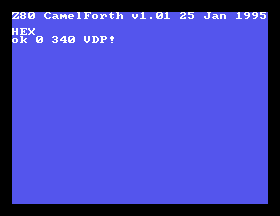
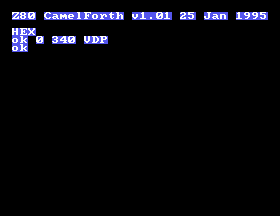
Oh hey. Why did it remove the ! in VDP! when I did that? Because that part of the font is living in the first eight characters of video memory and I just set it to black-on-black (one nibble for foreground, one for background.) Watch me bring it back.
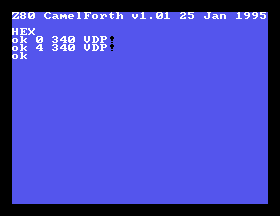
This is already a lot more interactive than trying to write an assembly program or burn a ROM to figure out how the VDP works.
Time to test the VDP read function, to make sure it works:
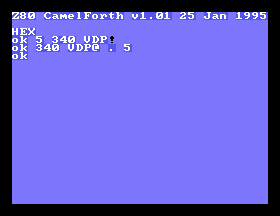
Great. We can read back from VRAM. This doesn’t seem immediately useful, except that this pair of words provides us with an additional (up to) 16K of RAM that we can access whenever if we don’t mind screwing up the screen too bad. There’s a good use for it coming up.
VDP registers
Of course, writing data to video RAM is only half the battle. To tweak all the functionality of the VDP, we’ll need a couple convenience words. This article is too short to go into the entire table of registers that you can set; if you’re really interested, please read Sean Young’s fantastic explanation for all of the deep magic.
There’s 7 VDP control registers, and 1 status register, which we’ll get into in a second. I implemented a quick write-to-control-registers word, and honestly the longest part of it was figuring out what to call it. I ended up with VDP#, though if there’s a more Forth-y naming standard, I would not mind changing it at all.
Here, I’m changing the overscan colour by writing to the control register at index 7:
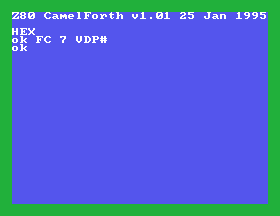
Control registers, unfortunately, cannot be read back. You have to keep a copy of them around if you want to just toggle one bit.
Status register
Another important word is the ability to read the status register. Most critically, in the status register is where the TMS9918A shows results of collision detection. Collision detection is limited to “do any sprites, any at all, overlap?” You then have to step through and figure out which sprites are colliding and if it matters – that’s where the VDP read word becomes useful, but we’ll get to that in a little bit.
This status register also tells us if we’re handling an interrupt at the moment. I wasn’t sure if this would be very useful for us in particular, as the SG-1000 doesn’t wire that line up to the Z80, and I assumed it was only for telling me if I’m in the screen blanking interval.
A lot of the register (6 bits!) is also spent on the “fifth sprite,” which tells us the first sprite that could not be drawn on the current scanline (there’s a maximum of four.) I assume that this is useful for multiplexing sprites somehow, but I don’t see a use for it right now.
Reading the status register clears the collision and interrupt bits, so unfortunately it’s not super feasible to write separate words that each get the current value of that register. I called this one VDP$ because I was really running out of ideas at this point. Again, suggestions for names are welcome. I could verify in the debugger that it was hitting the right port, but without running sprites, I wasn’t sure if it was getting the right values.
More complex words
Obviously, memorizing what magic bytes to put into VDP memory is not a fun time for any programmer, especially at an interactive prompt. As with the sound chip in the previous entry, though, we can build up more complex words from the simpler ones.
My goal for this first part was simple: I wanted to put a smiley face sprite on the screen. Actually, I should back up a bit. That goal sounds simple, but it involves:
- Creating a graphics pattern somewhere;
- Sending that pattern to the video memory;
- Setting up the sprite attribute table for that sprite;
- Enabling sprites;
- Moving the sprite somewhere I can see it.
The TMS9918A supports both 8x8-pixel and 16x16-pixel sprites. I had to read the documentation to figure out what their deal is. Like on the NES, the 16x16 sprites are sort of a “metatile” of four different 8x8 sprite patterns. From what I understand, they go in the order top-left, bottom-left, top-right, bottom-right. For now, I decided that 8x8 would be enough pixels to make a smiley face.
Sprite attributes are pretty simple, and consist of the X and Y positions, their patterns, and colours. The TMS9918A has several magic numbers in the Y-position, according to Sean Young:
The values have special meanings. If the Y coordinate is 0, it’s displayed on the second pixel line from the top. With value 255 it’s exactly on the the top line, and with coordinate 254 the top line isn’t visible any more, with 253 [the] two top lines aren’t visible any more, etc.
If Y is 208, that sprite and all following sprites in the table are not displayed.
It sounds like the first thing I’ll need, code-wise, are some convenience words to write to the sprite attribute table. They’ll take a sprite index and a value, compute the location in video memory for it (conveniently, it’s i * 4 plus an offset) and tell the VDP to write the value there.
I’m certain that I haven’t written these in an optimal or even sane way, but I’m on a deadline here and I really want to see some sprite action going on. I built those words, tested using the MAME memory debugger to make sure they went to the right place in video RAM, and moved on to get some actual data into these tables so we could display something.
Sprite patterns
I assumed that the sprite pattern data would be similar to the tile pattern data that I was already familiar with: one byte per row, with high bits being a “foreground” pixel and lows being a “background.” That would mean I needed to write a convenience function that would do i * 8 and then write eight rows of bytes.
For starters, I wrote a function that wrote a row one at a time, and I was able to use that to poke in a solid square tile that I could move around the screen:
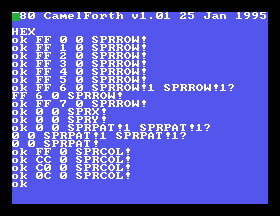
Wow! Sprites!
Eight items seems like a lot to put on a stack, and I’m not sure if there’s a “cleaner” way to define this in Forth, but I did what I could. You can load either with d7 d6 d5 d4 d3 d2 d1 d0 idx sprload or defining a ‘macro’ word like SPRSMILE. My first draft, of course, put the smiley in upside down:
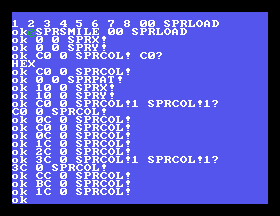
Playing with these registers interactively reminds me of the sprite functions on the Nintendo Famicom Family BASIC, in which I made a space shooter awhile ago. I’m not sure how a game loop would even work in this.
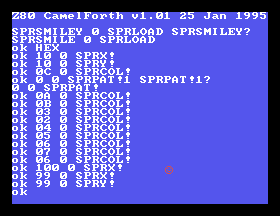
Let’s see if I can set the MAG (magnify) bit in the VDP registers, and turn this cute li’l guy from a 8x8 sprite into a 16x16 one with a single tile.
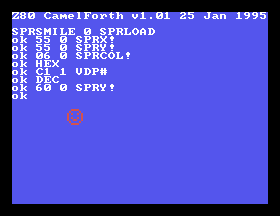
Wow, he got so big. What have we been feeding this guy?
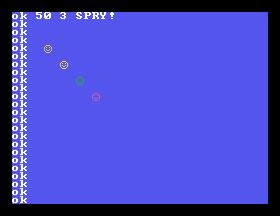
Whatever it is, leaving it out has only attracted more sprites.
Conclusion
For now, I’m happy with this very basic sprite support. I deliberately did not look over bfox9900’s amazing TMS9918 definitions for their TI-99/4A CamelForth port because I didn’t want to be biased by what they chose to do. Now that I have a working base, though, I’m really interested in taking a look.
In particular, I want to improve the syntax for loading a sprite, and maybe even do some “coordinate translation” to deal with the various odd settings and delayed-timing bits so I can arbitarily place a sprite anywhere in a linear x,y coordinate.
I think my next step will be either to get this running on real hardware, or to figure out how to read the joystick in an infinite loop and move the sprite around.
Thanks for reading!