A Typed Forth
Tags: computer sega sg1000 sc3000 soggy1000 homemade-software retrochallenge retrochallenge-october-2026
Now that we have a functioning Forth interpreter on the Sega SG-1000, it’s time to actually finish hooking up the keyboard input. Because I considered this task to be a little mind-numbing, I’ve put it off for years. How long do you think it took me to figure out? About an hour. One day, I’ll learn.
The story thus far
A few years ago, I was playing around with the Sega version of BASIC for the Sega SG-1000 game console. It was sort of the celebratory lap after adding keyboard support to the Soggy-1000, my low-cost open-source clone of the SG-1000.
That experience left a lot to be desired. Between the limited keywords, difficulty in extending the interpreter, and the poor runtime performance, I thought it would be possible to get a different language working on the machine.
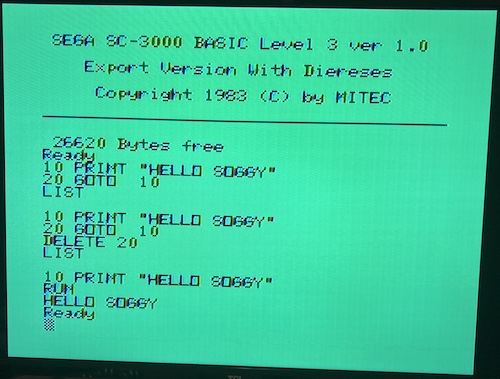
Forth is a super-popular language for low-level programming, as it offers just enough abstraction to keep you sane. Most implementations also offer an interactive “interpreter,” so you also get the immediacy of a good BASIC implementation. I decided to port CamelForth-80, the Z80/8080 port of the popular CamelForth interpreter, to the Sega SG-10001.
In the previous article, I documented how I got CamelForth to assemble on my modern assembler, and how I hooked the output from Forth to video output on the Sega SG-1000. Then, I ran into the problem of having to write some code to poll the Sega’s keyboard… and put it aside for several years.
Now, with RetroChallenge well underway, the pressure was on to actually finish that keyboard handling code, even if it’s clunky or otherwise inelegant.
Are you a scanner?
Now was the time for keyboard handling – some very boring, repetitive code! Yaaay!
To scan the keyboard on the SK-1100, you do this process:
- Set the lower three bits of port $df to the row of the matrix you want to look at.
- Do at least two NOPs to wait for the 8255 to select the lines, and for the data from the matrix to show up on the 8255’s input ports.
- Read the row from port $dc for the first eight columns, and $dd for the second four columns of the keyboard matrix. One bit per key will be returned; check which bit is set to know which key is pressed (“active low” in the code.)
- Based on your row position and which column is lit up on the 8255, look up and return the ASCII character for that key2 (if applicable) to the calling Forth code.
For starters, I ended up making a 14 x 8 2D array in the code, and then using bit tests to figure out which column to send to the array. The scanning function works something like this:
for row = 0 to 6: ' row 7 is for joysticks
        out($df, row);
        nop(); nop();

        keys_down = in($dc);
        for bit = 0 to 7:
                if bit(keys_down, bit) == 0:
                        return keymap[bit, row];
        keys_down = in($dd);
        for bit = 0 to 4:
                if bit(keys_down, bit) == 0:
                        return keymap[bit + 8, row];

' nothing pressed
return 0;
Inelegant, maybe, but it works. The actual implementation is insanely ugly, and involves a lot of hand-unrolled loops where I have this kind of thing copy-and-pasted forever:
_kbd_a_bit0:
        bit 0, a ; TODO: Could this be done in a macro?
        jr nz, _kbd_a_bit1
        ; handle key press at bit 0; IDX = 0
        ld c, (ix + 0)
        jp _segakey_out

_kbd_a_bit1:
        bit 1, a
        jr nz, _kbd_a_bit2
        ; handle key press at bit 1; IDX = 1
        ld c, (ix + 1)
        jp _segakey_out

_kbd_a_bit2:
    ...
Phew. That’s a lot of wasted ROM space and a very annoying chunk of copy-and-pasted code that could probably just be a macro at the very least. An obvious improvement would be to compare a to a bitmask, and just do bit shifts on that mask to iterate instead of constantly checking bit 0, a, bit 1, a, etc. But it worked, as you’ll see below.
The keymap looked something like this:
SOGGY_KEYMAP:
    ; 1, Q, A, Z, 0, ,, K, I, 8, 0, 0, 0
    .db 0x31, 0x51, 0x41, 0x5a, 0x0, 0x2c, 0x4b, 0x49, 0x38, 0x0, 0x0, 0x0
    ; 2, W, S, X,  , ., L, O, 9, 0, 0, 0
    .db 0x32, 0x57, 0x53, 0x58, 0x20, 0x2e, 0x4c, 0x4f, 0x39, 0x0, 0x0, 0x0
    ; 3, E, D, C, 0, /, ;, P, 0, 0, 0, 0
    .db 0x33, 0x45, 0x44, 0x43, 0x0, 0x2f, 0x3b, 0x50, 0x30, 0x0, 0x0, 0x0
    ; 4, R, F, V, 8, 0, :, @, -, 0, 0, 0
    .db 0x34, 0x52, 0x46, 0x56, 0x8, 0x0, 0x3a, 0x40, 0x2d, 0x0, 0x0, 0x0
    ; 5, T, G, B, 0, 0, ], [, ^, 0, 0, 0
    .db 0x35, 0x54, 0x47, 0x42, 0x0, 0x0, 0x5d, 0x5b, 0x5e, 0x0, 0x0, 0x0
    ; 6, Y, H, N, 0, 0, 13, 0, 0, 0, 0, 0
    .db 0x36, 0x59, 0x48, 0x4e, 0x0, 0x0, 0xd, 0x0, 0x0, 0x0, 0x0, 0x0
    ; 7, U, J, M, 0, 0, 0, 0, 0, 0, 0, 0
    .db 0x37, 0x55, 0x4a, 0x4d, 0x0, 0x0, 0x0, 0x0, 0x0, 0x0, 0x0, 0x0
To figure out the key map, I used the fantastic diagram from Enri’s SK-1100 writeup:
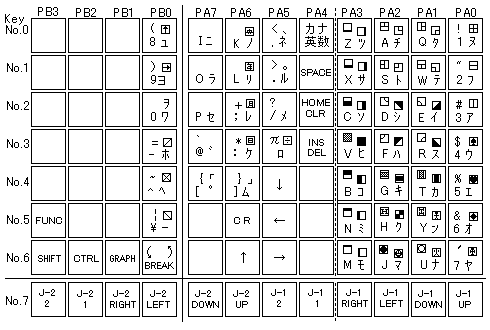
Now that you’ve looked at that matrix, you might notice that something is missing in my handling code up above: modifiers. How am I supposed to be able to type a ! if I am not handling the shift key? That’s a very good question, and one that I didn’t want to solve right away. Perfect is the enemy of good, and all that.
After some fumbling around – I forgot to actually increment the row counter and also overwrote the accumulator that I was using to store that counter – I managed to make it work!
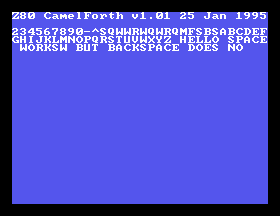
That progress feels really good after many years of procrastination. It’s not noticeably slow, either: even old 8-bit computers are good at doing stupid things really quickly, and it’s not like the computer is doing anything else when it’s waiting for input!
Even return worked, letting me ask the SG-1000 if it had heard of my blog:
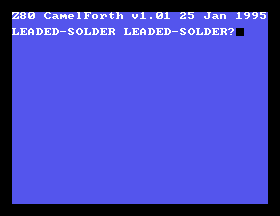
Now I can do some simple math:
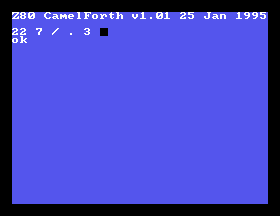
Even with all this mirth, there were two obvious bugs:
- Pushing backspace didn’t, well, backspace.
- Pushing the “1” key would reset the computer.
Checking my notes, I realized that the second issue had been a problem on my previous keyboard-scanning code, too. That’s weird.
Why does pressing “1” reset the computer?
After awhile of fumbling around in my code, I realized it would still happen even if the entire keyboard handling were to be commented out. I began to suspect MAME had something weird bound to the 1 key, and indeed it did:
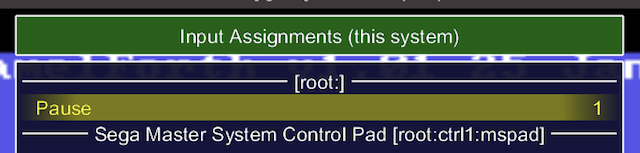
Oops. Pushing the 1 key, even with UI keys disabled, told MAME to push the imaginary pause button on the emulated SG-1000 unit, which triggers an NMI and then crashes because I don’t have a handler for it. Whatever chunk of memory that is located where the NMI vector is expected is no doubt wreaking havoc. I deleted this keybind in the MAME settings and suddenly it stopped rebooting.
The funny, or at least fascinating, part is that it would still type out the 1 before crashing. I’m not sure if this “double firing” is a bug in MAME; it feels like it’s debatable whether the pause button on the front of the unit is a “UI key” or not.
That said, the Pause/NMI button will have to be handled later, because not handling it is sloppy and I already have a reset button on my hardware. I don’t know how to handle it yet, so I added it to my TODO.md and kept going. Now for the mystery of the backspace!
What’s wrong with the backspace?
After a few more minutes of squinting and reading code, it turned out to be the same problem as 1. Well, almost the same problem. The “INS/DEL” key on the emulated SG-1000 was bound to Delete and not Backspace. With a quick rebind, I could suddenly make mistakes again.
Can’t type worth Shift
Now that I could write a Forth program, it was time to… write a Forth program. Only one problem, though. Without a shift key, there is a lot of punctuation I can’t do, such as ", +, <, =, you know… unimportant things for writing programs. I would have to implement the shift key, and potentially ruin my whole day.
My first whack at the problem was to do exactly what I described above: add a second keymap, and just use that instead when the shift key was held down.
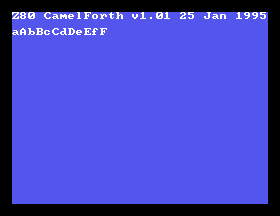
This caused something unexpected to happen: the lowercase letter that I intended was immediately followed by an uppercase letter. At first, I thought this might be my debounce code, but I realized that not every letter was doubled up. For instance, j, 7, u, and m didn’t fire twice when shifted. If you check the key matrix up above, you’ll notice they’re all on the “last” row… with the modifiers. That was even less expected. What was going on?
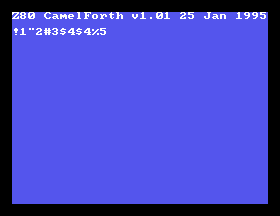
I fumbled around for the better part of a day. In the meantime, I did realize that you could use backspace to remove the extraneous character and actually write some useful programs:
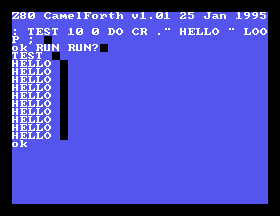
As I was trying to debug my problem, it turned out to have some particularly weird phenomena. If I didn’t scan row 6 during the regular scan, the shift key wouldn’t work at all. This sent me down a bit of a rabbit hole where I began to suspect the emulator3, but we all know it’s never the emulator. It’s my fault.
I had hacked up the keyboard-scanning code I just wrote to “check the shift row first,” and so I started tracing the code step by step instead of looking at the comments. Uh, turns out I forgot to actually write to the port that changes the keyboard row. Oops!
I had written it like this:
        ld a, 6
        ld (KBD_SCAN_ROW), a ; select the accelerator row
        nop
        nop
But what I really meant to write was this:
        ld a, 6
        out ($de), a ; actually write to the port you idiot
        nop
        nop
KBD_SCAN_ROW is a global that I used to make the scanning code a little easier to write; it just keeps track of the row index so that the contents of the accumulator don’t get destroyed during the tests. I’m still paranoid about inadvertently stomping on a register that the outer Forth needs.
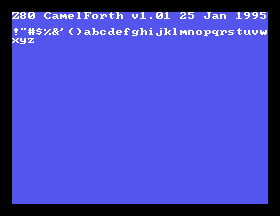
D’oh.
Conclusion
Phew! I feel kind of dumb putting this off for so long when the initial implementation was so quick to do. Of course, I keep generating more bugs, but there’s always next week.
Even after these little bugs are fixed, there’s still a lot more to do for keyboard handling. For starters, I want to see if I’ve got room in the character set for kana and graphics characters. It’s easy to lose track of how cool something as simple as “type characters and have them show up on the screen” is.
This was a lot of work. If only there was some kind of higher-level language with loops and stuff that I could have written this keyboard driver in. Maybe it could even compile down to assembly for optimization?
Thank you for reading! I hope to see you again soon.
-
CamelForth-80 is GPLv3 licensed, so I am publishing the modifications to my GitHub repository here. Use it at your own risk! I have no guarantee the main branch will remain unbroken. ↩
-
Yes, this prevents you from pressing more than one key at once, but the SK-1100 keyboard doesn’t have any anti-ghosting diodes, so it’s likely to not be a problem. We’ll see if it actually becomes one in practice. ↩
-
I did try the fantastic Ares emulator, but for whatever reason it will load neither this Forth ROM nor my homemade RAM tester, both of which work fine in MAME, and the RAM tester even works on real hardware. I will have to do some more investigation later. ↩