No longer a theoretical Camel
Tags: computer sega sg1000 sc3000 soggy1000 homemade-software retrochallenge retrochallenge-october-2026
In theory, theory and practice are the same thing. In practice, they’re not. That’s sort of the same problem with emulators – even the best ones are not always the same as real hardware. Although MAME is very robust and useful for development, eventually you have to buckle down and get your stuff sent to a real system.
Initial test: Soggy v3
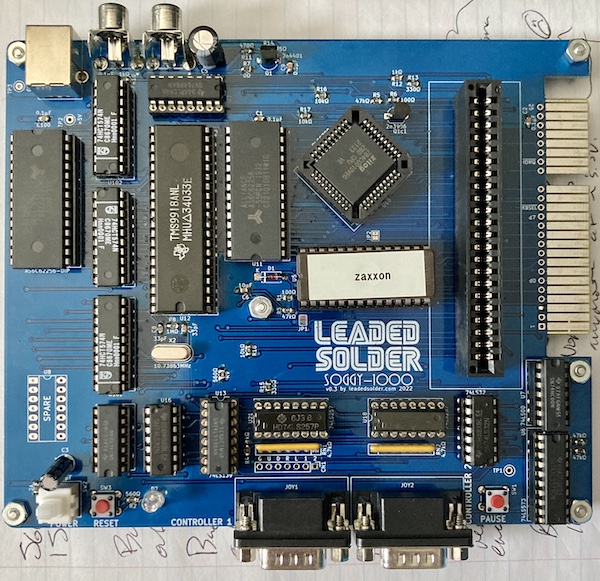
Because I knew it would involve the least amount of work, I pulled my clone SG-1000 motherboard from the “loose pile” side of the desk to the “testing” side of the desk. In case you’re unfamiliar, my SG-1000 clone is called the Soggy-1000, and it features a lot of things the original machine didn’t, like:
- 32K of RAM, with a built in paging mechanism;
- Cartridge-slot compatibility with the Sega SF-7000 disk drive unit;
- Composite output;
- USB power;
- And a socket for a built-in game (in this case, Girls Garden.)
I’m pretty happy with it, and if you’re willing, you can read more about the development of the machine by checking out any of the previous posts:

![thumbnail for Soggy-1000 ][](/thumbnails/soggy-1k-v0.2-assembled-boardshot.jpg "thumbnail for Soggy-1000 ][")


My Soggy v3 board has been used quite a bit, maybe more so than some authentic SG-1000s have been. It’s been a trusty companion whenever I have to show off my projects, and although there are newer versions of the board – some in beautiful cases – I keep coming back to this one because it’s always around.
Since I’ve been using it a lot for development, I am fortunate to already have some tools lying around as well. Such as a cartridge PCB with a ZIF socket in it, so I can quickly swap ROMs. I burned a 27C256 after padding and mirroring the (now slightly over 8K) ROM to 32K, and popped it into the ZIF socket.
My first try ended in failure: I got nothing but a black screen. I didn’t panic, though. I reached for my RAM-test cartridge to make sure the Soggy-1000 still worked, and after finding that it did, I removed and re-seated the Forth ROM in the cartridge. Sometimes the legs get corroded or otherwise funky, and ZIF sockets contact chip legs differently than the usual socket. This happens to me a lot, as you have probably already determined.
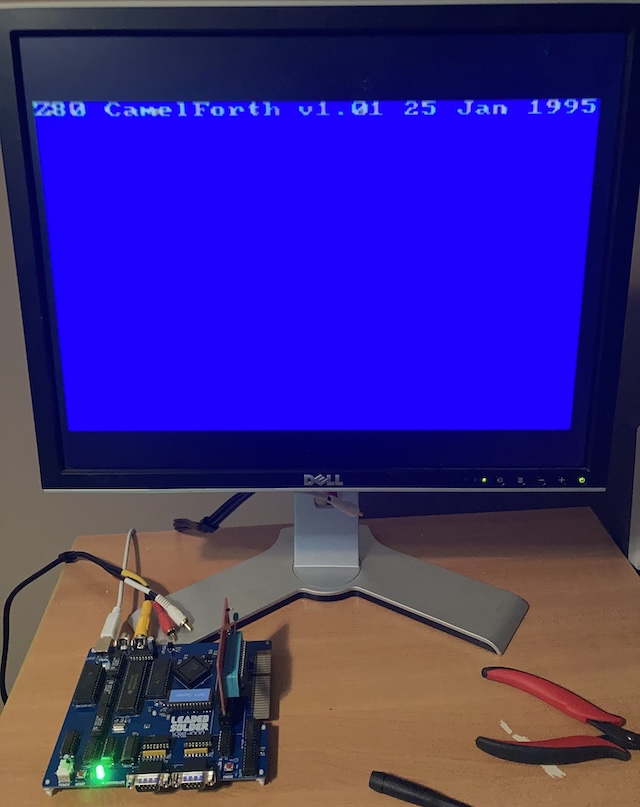
This time, CamelForth booted right up and gave me the sign-on message (I’d like to update the date as part of the build process, but it seems like work.) A lot of stuff has to go right to get this far. I took a celebratory picture, and then realized I forgot to plug in the keyboard, so I went to go get it.
SK-1100 Test
I am lucky enough to have an original Sega SK-1100 keyboard. This is the keyboard that is designed to go with the SG-1000, and they’re unfortunately not particularly common these days. If I could not find one, I would have made one, but we all know how well “me making a keyboard” ends up. It may still happen.
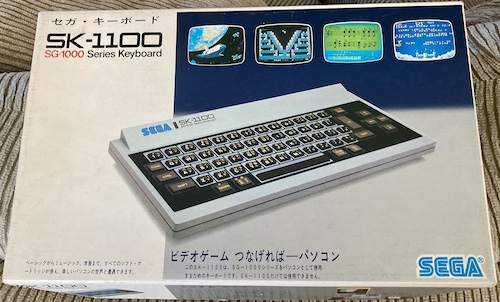
As you can probably imagine from looking at it, it’s not a particularly easy keyboard to type quickly on. The rubber key mat bounces all over the place, and it’s hard to press the exact right amount of firmness to get the keys to register without echoes.
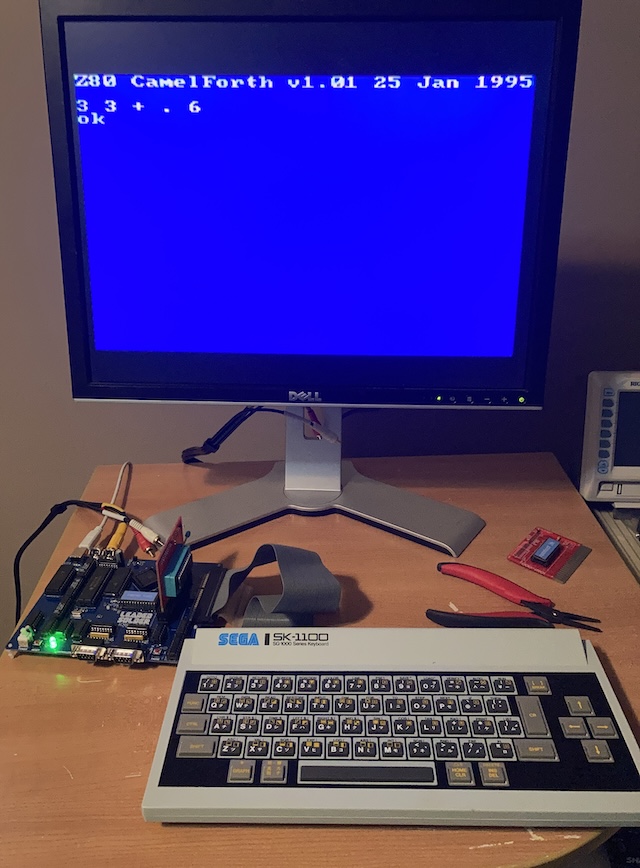
After plugging it in, I started the Soggy-1000 again, and was happy to find out that I could type.
I was somewhat less happy to find out that it has debounce issues with the space bar, and at one point backspacing seemed to have not removed a character from the input buffer properly. However, as long as I took my time, I was able to enter some simple math problems:
And I was able to use my new sprite words from the previous entry to get a smiley face on the screen:
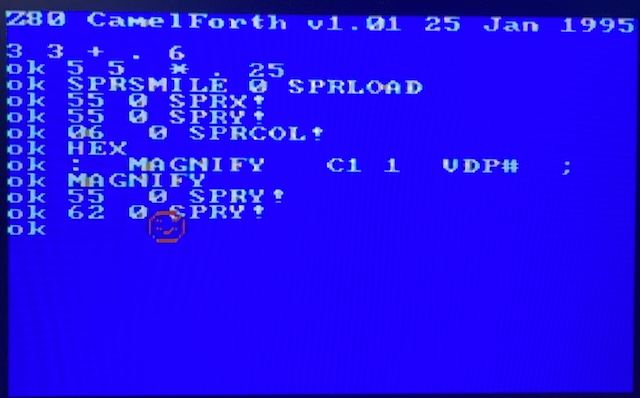
Excellent! So we know it works on a real computer, with at least 8K of contiguous RAM.
I would have liked to try this on my 2K SG-1000 II, as well, but I had forgotten that it only has RF output. My many Japanese RF-speaking TVs are all somehow on the fritz at the moment, so this test will have to wait for a future date.
Double-checking
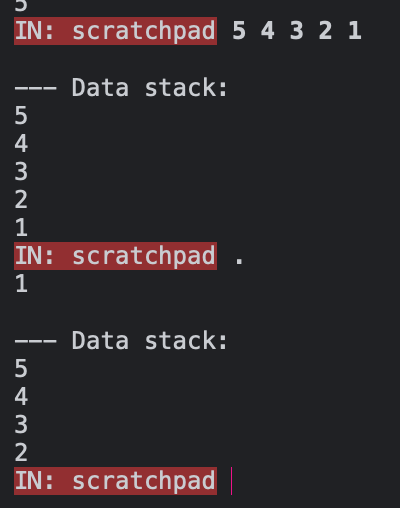
I couldn’t help but feel I’d screwed something up, though. When I kept adding things to the stack in Factor, they stayed on the stack:
Whereas in my nascent port of CamelForth, they don’t:
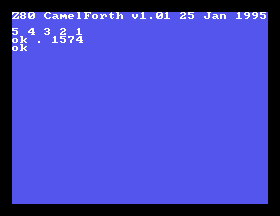
I expected to get, you know, 1. Not 1574, which I knew from many experiments is the value I get when the stack underflows. What’s going on with my stack?
To make sure it wasn’t a quirk of my particular flavour of Forth, I decided to confirm against the original CamelForth/80 sources. I downloaded them and decided I would use the RunCPM emulator. RunCPM is a really amazing, feature-filled project with a huge amount of potential for hobbyists, but right now I only wanted to be able to assemble the sources and run them.
Building and installing RunCPM is a bit of a project on its own, as the readme lacks a “quick start,” so you have to, you know, read it. But I’ll do you a favour. Here’s the quick-start guide to getting CamelForth/80 working on RunCPM:
- git clone RunCPM to your local directory.
make macosx buildin the RunCPM directory to produce theRunCPMbinary.cp ../DISK/A0.zip .into the same directory as the binary.unzip A0.zipto create theA/0/...directories, which is the A disk and the number-zero user area for that disk.- With the CamelForth sources, again
unzipthem intoA/1. You don’t necessarily have to use the number-one user area, but it made sense to me. - Get the Z80MR assembler, and put
Z80MR.COMin the sameA/1directory. - Start
RunCPM. - Navigate to the number-one user area with
user 1. - Assemble the camelforth sources with
z80mr camel80. - Create a binary from the hex file1 produced by z80mr, by typing
load camel80. - Run
camel80.com.
With that working, I can now confirm that CamelForth is of course not supposed to behave this way:
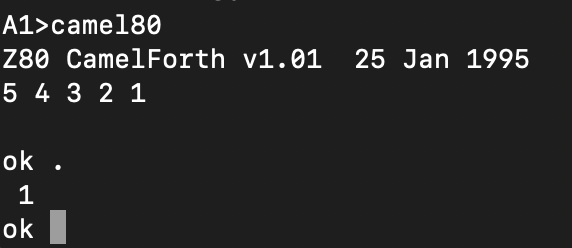
Some of my modifications to the interpreter – likely either KEY or EMIT – have whanged the stack in the process. I had a sinking suspicion this entire time that I’d been doing this, but it didn’t become really obvious until I started trying to debug any of the Forth code I’ve been writing.
Although this bug wasn’t causing me problems at the moment, any divergence from “actual” CamelForth was likely to bite me in the butt later on. I decided to fix it now, than after I had written a complex Forth program that mysteriously didn’t work.
Fixing the stack stomping bug
First off, I checked the camel80.lst file. Zasm generates a listing with all of the major labels and their address. I had a suspicion that the mysterious 1574, also known as hex $626 , would be found somewhere. It turns out to be the address of EMIT, which confused me. No doubt I was going too far in my popping and ended up stepping into the Z80 call portion of the stack.
I spent a bit of time poking at the EMIT function I was so proud of, and noticed that I seemed to be doing some unbalanced register pushing/popping. What’s worse, the code was very hard to read. Some simple hacks and experiments didn’t seem to make much of a difference, but I knew I had been messing with this function before I knew what the rest of CamelForth expected out of a “well-behaved” assembly word, and it was likely to be my culprit.
To confirm my theory, I commented out my EMIT and wrote a very simple, very nasty version that didn’t call any macros or do anything fancy in order to write the character into the VDP buffer:
 ; character in C
 chead EMIT, 4, EMIT
   ld hl, (INSERTION_POINT)

   ; set address
   ld a, l
   out (VDP_REGISTERS), a
   ld a, h
   or 64 ; set vdp write bit
   out (VDP_REGISTERS), a

   ; write the character
   ld a, c
   sub $20 ; shift ASCII into our charset
   out (VDP_DATA), a

   ; increment hl
   ld hl, (INSERTION_POINT)
   inc hl
   ld (INSERTION_POINT), hl

   ; drop the argument
   pop bc
   next
This worked properly, exactly as I expected:
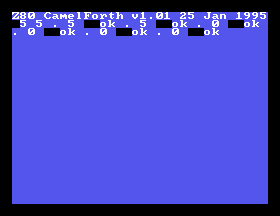
So, something in EMIT was definitely the culprit. I decided to bite the bullet and actually (gulp) read some code. I didn’t get very far until I realized that I was doing a lot of pushes at the top of the call to swap hl and bc. Why was I doing that? Because my SetVDPWriteAddress helper function expects the address to be in bc.
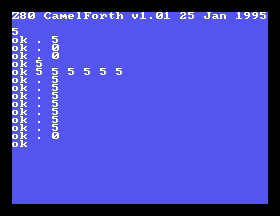
I rewrote it to use hl without doing any swapping or nonsense, removed a lot of the extraneous pushes and pops, and suddenly it worked. Phew! Having a broken EMIT is like not being able to trust your own eyes. Now, I can fully inspect the stack even after it blows up.
Next steps
This week didn’t give me as much time as I wanted to play with CamelForth! However, I still think I got some good work done. Turns out it’s a powerful motivator to go get your crap off the other side of the desk and run it on real hardware.
RetroChallenge, and this part of the project, are quickly coming to an end. I’ll see you on creepy old Halloween for a sum-up post, and some links to where you can have a CamelForth adventure on your very own SG-1000.
Thanks for reading!
-
For more details on this workflow, check out the time I assembled some code on an NEC word processor. Coincidentally, it was also for a RetroChallenge! ↩