More like SC-Forth-thousand, am I right?
Tags: computer sega sc3000 soggy1000 homemade-software retrochallenge-october-2026
The Soggy needed a good low-level programming environment with which to tinker on future hardware projects, and ideally it was one that I controlled myself, so I could include it on the onboard ROM without infringing copyright. It would be nice if it used a semi-popular programming language for embedded systems, and had an interactive development environment that I could run right on the machine. All that seems to mean I’m finally going to make my first Forth.
The Soggy?
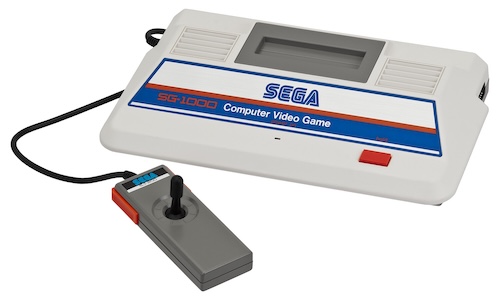
Sega’s first home console and their first home computer are very similar machines. Although the exact reasoning hasn’t been said (to my knowledge,) Sega originally planned to release multiple home computers, at different levels of capability. This plan changed to releasing just one home computer (the SC-3000) and one game console (the SG-1000.) Unfortunately for them, the SG-1000 released on the exact same day as the Nintendo Famicom, but Sega considered it to be a success anyway.
What’s interesting about the shared heritage between these two machines is that you can attach a keyboard to an SG-1000, in order to turn it into sort of a de facto SC-30001. A lot of companies promised stuff like this in the 80s, and Sega delivered. As a result, you can run (a very limited form of) BASIC on your SG-1000.

Although I have a very fragile and deteriorating SC-3000, I wanted something I could play with without worrying about shattering delicate keyboard plastic on. The prices of somewhat-more-durable SG-1000s are high and on the rise, especially the very Shōwa-futurist first-generation model. I also had experience with making a clone of the ColecoVision, which uses many similar parts to the SG-1000 (but is not cross-compatible in any way.) I ended up making a clone of the SG-1000, called the Soggy-1000, and made sure to make it compatible with the SG-1000 keyboard.
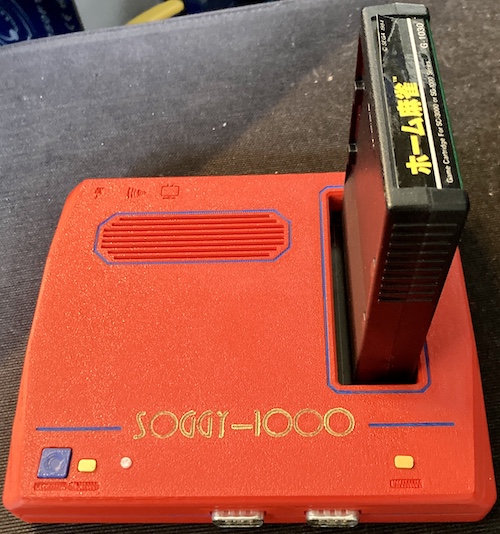
Naturally, with this kind of ambition and/or excess free time, I quickly ran into the limitations of Sega’s BASIC. A real computer should be able to build programs on and for itself!
RetroChallenge
This project is done as part of the RetroChallenge, a quasi-annual informal competition where everyone gets together and does something cool with retrocomputers for an entire month. This is for RetroChallenge 2026/10. I find that the event helps force me to work on one project, instead of bouncing around between a billion ideas, and so I can get big leaps of progress out of my projects in just one month.
By the rules of RetroChallenge, you are not supposed to start your work early, so that’s why this article is coming out at the very start of the month. It’s all stuff that I have done months, and in some cases, years prior, and the real “challenge” is just getting me to finish it. Everything from now on is part of RetroChallenge, and this article should serve as a primer to figure out just what it is I am trying to do.
Okay, on with the Forth.
Why Forth?
In case you’ve never heard of it, Forth is a very minimal high-level programming language. It’s very common in embedded and small systems, mostly because it’s easy to get the base system working and then lets you incrementally build some functionality using a command shell. Think of the Python REPL, and you’re on the right path.
It takes awhile to wrap your head around the stack-oriented design, but once you do, it is surprising just how elegant the language is. What the Hell is Forth is a great read on the subject, which I saw kicking around the internet only after I started on this ridiculous project.
Another big appeal of Forth to me on these limited machines is that, in many distributions, Forth often includes an integrated assembler. With a suitably equipped Forth interpreter2, you can bang out assembly language programs in a REPL on the real hardware, which is an experience you can’t really get anywhere else.
The biggest grain of salt to take with this article, and pretty much every future one I write on the subject, is that I don’t really know how to write programs in Forth. I can hack together a simple program with some serious effort, but I still need to jump back to the documentation to understand a lot of the jargon, and I am almost useless at reading code. Do not consider me as a Forth expert, or even an enthusiastic amateur. The point of this series is to show how easy it is to bring up a Forth interpreter on any random computer you may encounter. If you’re an experienced Forth programmer, please forgive me any screw-ups in advance.
Why Forth on the SG-1000/SC-3000?
With Forth on the SC-3000, I can write all kinds of programs, in a more space-efficient way than with BASIC3. It’s also, frankly, less irritating: I got more than my fill of renumbering large BASIC programs in the 90s.
Forth’s higher-level and more structured than assembly, which means I can write programs much faster without stepping on myself trying to remember the semantics of otir. If I want to, I can even include an assembler, so I can write really fast, useful code right on the machine without having to involve a “real computer” to cross-assemble for Z80.
Last, with the ROM-socket on the Soggy, it also provides a useful platform to make it more useful as a general-purpose computer, with a powerful programming language that’s ready to use from a cold start. I can even write device drivers for new stuff connected to the expansion slot! Like the aforementioned article says, it’s like an assembly REPL.
While I was working on this project, I also found an amazing article in Kilobaud magazine, called, well, Write Your Own FORTH Interpreter. If you’re interested in the mechanisms of how these things really work under the hood, make sure to open that up in a second tab. Or third, or 400th. We’re all friends here.
Port a Forth
I first wanted to start out by porting a Forth. This would cause me to get a lot of the “SG-1000 specific” stuff out of the way, plus maybe give me some good ideas about my implementation. The RomWBW project contains a fork of the GPL-licensed CamelForth-80, by Bradford J. Rodriguez.
CamelForth is originally intended to run on CP/M-80, but the author has thankfully provided a thorough porting guide for how to modify it to run standalone, out of ROM. I have to write my own hardware initialization (TMS9918, stack pointer, etc,) a reset handler, move some buffers around, and replace three words that are implemented to use CP/M.
Those three words, implemented in Z80 assembly, are:
KEY: Returns the key being pressed;KEY?: Returns true if a key is waiting;EMIT: Prints a single character to the screen.
It’s really nice to see a thorough porting guide like this. I read through the source code and tried to come up with a plan for attack, merging it into the codebase of my RAM testing program in order to provide a console interface and basic keyboard-reading functionality.
Since the RomWBW version was modified, I ended up grabbing the original from the CamelForth website and working from that.
Getting it to Assemble
You might think all Z80 macro assemblers are pretty much the same. However, there’s a lot of differences in syntax, the order of operations, and especially in macro implementations. CamelForth-80 was originally built with the freeware/public-domain Z80MR assembler, but I have been using Zasm for all of my Z80 projects to date.
I don’t have a particular attachment to zasm, but Z80MR is meant to run in CP/M, and as far as I could tell did not have a modern Mac/*nix port. In fact, if you do a web search, the majority of surviving references to its existence are from CamelForth-80’s own readme. I had to hunt around for a little while until I found this copy of it in the DiscMaster archive of the Oakland CP/M archive CD, where it was distributed in (what else?) Z80 assembly.
So: I’d have to port the assembly from one assembler to another. Should be easy, right?
Building It
The first place zasm bailed was on the very first Forth word defined in the source code, EXIT.
in file camel80.asm:
210:         IF  .NOT.(docode=DOCODE)
                      ^ condition not evaluatable in pass1
That word expanded a macro, head, which itself expanded into a conditional define – an #ifndef, if you will.
head    MACRO   #label,#length,#name,#action
        DW link
        DB 0
link    DEFL $
        DB #length,'#name'
#label:
        IF  .NOT.(#action=DOCODE)
        call #action
        ENDIF
        ENDM

[..]

;C EXIT     --      exit a colon definition
    head EXIT,4,EXIT,docode
        ld e,(ix+0)    ; pop old IP from ret stk
        inc ix
        ld d,(ix+0)
        inc ix
        next
It looks like the last argument of the macro invocation, docode, is meant to signal that the word is implemented as an alternative assembly-language routine, rather than to consider it “as pure Forth.” In other words, it’s thunking out to native code.
Many of the words in CamelForth are defined as docode, which would then match the DOCODE define at assembly-time, assembled into the binary, and then be called when that word is requested at runtime. Others will use the dovar or docolon handlers, which respectively define a Forth variable or composes a Forth word from other Forth words. docode has no special implementation and just falls right through to the rest of the assembly language defined in the word.
The exact way it’s implemented doesn’t really matter to me, but it seems that zasm does its passes differently than z80mr does, and is complaining about it. It does not want to expand the macro and evaluate the macro that came out of that macro on the same pass.
Quoth the zasm documentation:
‘if’ starts a block of assembler instructions, which is only assembled if the given
is true. The must be evaluatable in pass 1. Conditional assembly may be nested. note: this may change. […]
Normally the assembler directives with ‘#’ should be used. Except that ‘if’ and ‘endif’ can occur in macros and the expanded macro can conditionally exclude some code.
So… including this from a macro should be fine. Why can’t it figure out if our action is equal to DOCODE, a constant, on pass one? I couldn’t figure it out, so I ended up copy-pasting the head macro and making two versions: one that was for everything but docode and one that was just for docode. Then I did a search and replace, and those assembly errors went away. The same thing had to happen for immed, the macro that defines immediate words4.
I also had to escape bare characters like <, as the assembler expected a matching brace, or in the case of <>, eliminated them entirely, leaving an empty string.
The next problem was some seemingly oddball names for words. Forth is extremely loose with its naming rules compared to other languages. You can name a dictionary word pretty much anything you want, as long as it doesn’t have a space in it. There’s words called things like COMPILE, or just ,. The head macro generates the strings that are matched to call these words automatically, as you can see above from the '#name’ line.
You have head macro invocations like this:
immed SQUOTE,2,S",docolon
You and I both know that that is intended to become a word called S", and that they’re not trying to define a string, but zasm is pretty sure that quote mark’s the start of a string.
Zasm has trouble parsing some of these lines, because it doesn’t know they’re not really going to end up being a string in the end. Presumably Z80MR doesn’t care, or its parser can deal with this somewhat unusual case more carefully.
356:     immed SQUOTE,2,S",docolon
                                  ^ closing '"' missing
Words with commas in them were even worse, as the original author had pre-quoted those. Presumably Z80MR is loose enough that it didn’t mind inserting those into a quote inside the macro either:
99:         DB 3,'',CF''
                   ^ closing quotes expected
Escaping those quotes in a bare word, as I had with <>, is a no-go either. Commas are special in a zasm macro invocation:
85:     chead COMMAXT,8,COMPILE\,
                                 ^ too many arguments: required=3
If I use double-quotes to escape it, zasm just goes ahead and crams those into the listing file verbatim, which isn’t good since I’m going to have to type these later to run the words:
DB 1,'"."'
Zasm’s documentation is unhelpful on this front:
Note: special characters in string cannot be escaped with ‘'. This syntax was (probably) invented later for the programming language ‘C’.
I decided there was no good reason to do it this way, and rewrote the macro so that it doesn’t try to string-quote the words. Then I went back and changed all the head and immed invocations to use proper quoted strings for the “name” slot.
I could have probably done this more cleanly, especially as ROM space will one day become a limitation. In order to get to the fun parts of this project faster, though, I wanted to get it out of the way.
A big final hurdle is that zasm has case-sensitive labels: the CamelForth-80 code often uses lowercase to define a label and then UPPERCASE to refer to it in code. Luckily, zasm also has a --casefold option that tells it to act more like a CP/M-80 assembler. Success!
At last, I had something built. Now, I just had to make it run on the SG-1000.
EMIT
Writing the EMIT function was a big challenge, but it’s one that I had expected would be coming up. As you might have been able to guess, EMIT prints one character at a time to the output device. On CP/M, the BDOS handles the nitty-gritty of this, sending it to either a TTY or the screen, including scrolling and buffering. On the SG-1000, we’ll have to handle this with the TMS9918 VDP, which does not support hardware scrolling.
First, let’s talk about what graphics mode we’re going to use to display the text sent to the virtual terminal. Because it’s easy to program, I chose to use the TMS9918 mode 1, or “Graphics 1.” This provides a 32x24 tile display. Although this mode presents significant drawbacks, mostly its tiny amount of visible characters, I find that it works well on a television set and also is – again – very easy to program.
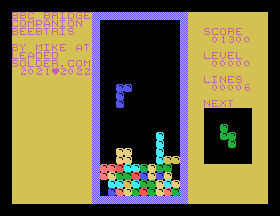
First, I had to establish a means of communication between CamelForth and my nascent “terminal.” For starters, I needed to figure out how CamelForth was telling me which character it wanted to have printed. After some experimentation at making a native-code (docode) handler that wouldn’t crash the system, I eventually found that the register C contains the character they wanted me to print. So I shifted that around to get into the area of my font, and…
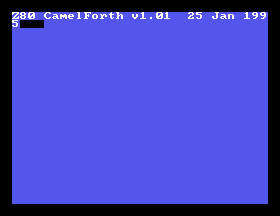
This was pretty cool, although it turns out that I had screwed up the calling convention and the system kind of halted at this point with a corrupted stack. After half-fixing that error, I now had an infinite spew of ok messages as the nonexistent keyboard input was read, presumably interpreted as a null-terminator (ascii $00,) and QUIT was invoked.
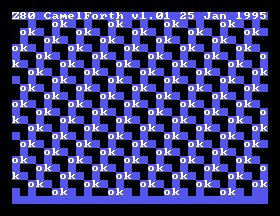
Eventually this stream of ok would run off the end of the nametable memory and start corrupting other parts of the VRAM, so this was a good excuse to implement scrolling. Sure, I could figure out and fix the problem first, but why waste a perfect scrolling test situation like this?
Implementing Scrolling
At first, I thought I could do scrolling in a clever way by having a ring buffer of the screen dimensions in RAM, and then I’d just update that buffer as I am asked to print out more text. If I run off the end of the screen, I’d need to scroll. To scroll the screen in this model, I’d blank the screen, redraw all the lines one tile up, and then wipe the next line encountered and start storing characters into that.
However, I ran into two problems:
- Storing an entire screen buffer - 32 by 24 characters - takes up 32*24 = 768 bytes of RAM. That’s almost the entire 1K available for the original SG-1000, which I’d like to support, and doesn’t leave much room for the actual Forth interpreter5;
- There was no actual reason to store the screen buffer in work RAM6, other than when I scrolled, which was going to be a very slow copy operation anyway.
We already have a buffer in which the characters on the screen are stored – the VDP’s video memory! The VDP has a massive 16 kilobytes of RAM available to it, and we can read and write it from the CPU. For instance, we often write to it to, uh, print messages to the screen.
Although I thought about doing something fancy with the nametable memory pointer, I ultimately decided the best way to scroll would be something akin to this pseudocode:
for y from 0 to height - 2:
    for x from 0 to width - 1:
        get character at (x, y + 1)
        store it at (x, y)
blank out last line to prepare for new input
All this interaction with the VDP might be a little slower, but at least no system RAM is consumed by it.
Because the height and width are fixed in Mode 1 as 32 columns by 24 rows, I ended up turning it into this simpler loop:
for hl from 0000 to 32 * 23:
        get character from vram[hl + 32]
        put the result into vram[hl]
blank out last line to prepare for new input
That was much easier to write, although I suspect I could have used the mysterious Z80 index registers as I was working with a fixed offset. I didn’t want to sweat the speed, considering I was going to spend most of my time waiting for the VDP anyway and had nothing better to do until it was ready.
Because I’m not doing this inside the blanking interval, there is the risk of a little bit of tearing on real hardware. The reader is welcome to do a super smooth per-pixel scrolling routine that never flickers.
Although interacting with the VDP is expensive, especially when doing a read followed by a write, the end result was good enough. In a future version, I could always speed it up by using a small buffer in RAM to store the temporary values and read a line at a time, so that I’m not constantly flipping between read/write with different addresses. Or I could do it all in the vblank interval, instead of risking tearing and ugly artifacts by doing it while the VDP is busy drawing a frame.

Nice.
Backspace and Newline
There were, of course, other complicated aspects to doing EMIT. Not every character is as simple as “draw tile at insertion point, increment insertion point, scroll if you need to.”
For instance, there’s backspace, which I think we can all acknowledge is an important key. If you haven’t experienced it before, I strongly recommend trying it.
Here’s why it’s difficult to implement. When “printed,” the backspace character is intended to clear the space prior to the insertion point, and prevent the insertion point from advancing. Both of those are unusual behaviours for a character, which usually do the exact opposite.
That’s bad enough, but because it’s moving in the other direction, that means there’s a potential for it to actually run off the start of the video RAM addresses and start writing into the other end of it. So your backspace code ends up having a bunch of special cases for “if they’re trying to do backspace, don’t do the normal method and do something else entirely.” I fully admit that I could have made it cleaner by rewriting it instead of adding a bunch of spaghetti-code bodges, but that’s life.
I also ended up making a clever piece of code for newline, which I’m somewhat proud of. The sticking point for me was trying to figure out which position is “the start of the next line.” After sitting and thinking about it for awhile, I decided that the cleanest way to express this in C would be something like:
if(to_emit == '\n') {
        insertion_point = (insertion_point + 32) % 32;
        // ...
}
This is a pretty simple solution. It finds the next line, and since it’s forcing it to a multiple of 32 using the modulo operator (%) then we’re sure it’s going to be the start of that line.
However, modulo on Z80 is a little tricky to write, so I thought about it some more. And a few days later, in the shower, I realized that 32 is a power of two, which means I could just use a bitwise operation to knock off the bits that make up any value other than a multiple of 32:
if(to_emit == '\n') {
        insertion_point = (insertion_point + 32) & 0b11100000;
        // ...
}
For instance, buffer position 33 becomes 64 using this strategy (65 is 0b01000001, which becomes 0b01000000 when you knock off the bits you don’t care about…)
I am sure that this is a commonly-accepted trick with 8-bit machines, but I felt kind of clever for figuring it out for myself. This implementation of newline was pretty quick to express in Z80 assembly, which would now join backspace as the second “special case” to EMIT.
It’s not ok
Now I just needed to figure out why the interpreter was going bonkers and repeatedly invoking QUIT, which is the word that eventually puts ok on the console.
When I started on this project, I had a very rough idea of how interactive Forth interpretation would work, based on a dim memory of half-awake reading of some Forth books in university:
- User types some stuff.
- User hits enter.
- The interpreter breaks up the user’s input by splitting it along the spaces and storing the tokens in some kind of buffer –
2 2 + .becomes['2', '2', '+', '.']– and starts executing from the left side. - The interpreter sees a token, then looks for it in the dictionary to see if it’s a word, and calls that word. At the end of each word’s implementation, it calls
NEXT. NEXTgrabs the next token of the input and performs step 4 again.- Assuming there has not been an error, when there are no more tokens left,
NEXTcallsQUIT, which cleans up some interpreter state, printsokto the console, and returns control to the user.
My skills in reading and following assembly are a little amateur-hour, especially when that assembly is interspersed with Forth. I decided to set a MAME breakpoint on the implementations of KEY? and KEY, but neither one was being called!
The nice thing about CamelForth being based on CP/M is that I was able to figure out anything that was interacting with BDOS7 by checking what called the BDOS word – a native-language call that sets up the arguments and then calls CP/M at $05 . Naturally, since the SG-1000 doesn’t have a CP/M BDOS at that location, calling into that address would probably result in nothing, or a crash.
After some more prodding around, I found a mysterious word CPMACCEPT that was repeatedly being called by QUIT. After reviewing, I realized that QUIT was the code that handled the input buffer. So why did the readme talk about implementing KEY and KEY?, but not this?
I spent a good hour trying to figure out how CPMACCEPT worked, and how to modify it for my purposes. Then I did a Google search, and found that the bug had already been reported by another hobbyist. The solution? Just change the call to use ACCEPT instead of CPMACCEPT, which uses KEY as you might expect.
Even after that discovery, I still had to wrestle with the code a little bit to try and understand it, and ended up gutting KEY completely in order to get it to work like I thought it did (or at least, should.)
I quickly banged out just enough of a keyboard driver to be able to enter the letter A and the carriage return. Using some bodged code, I could enter a nonsense all-As word now, hit enter, and confuse the interpreter.
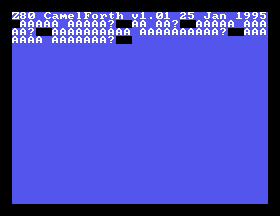
Yeah, I bet you don’t know what AAAAA is. Not yet, at least.
I defined a word in the assembly source:
head AAAA,4,AAAA,docolon
        DW LIT, 5, LIT, 5, PLUS, DOT, EXIT
In other words, it’s the hardcoded equivalent of the Forth definition:
: AAAA 5 5 + . ;
Or in English, “when someone comes by looking for AAAA, you add 5 to 5 and then print out the result, capiche?” Maybe that’s multilingual, I don’t know.
Anyway, after assembling, I typed in that new word, and called it:
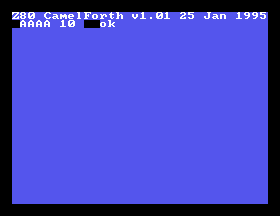
That’s pretty cool!
What’s NEXT?
Little Forth joke there. For the rest of RetroChallenge, I will be implementing keyboard handling. It’s been a couple years since I did the work described in this very post, and the pressure of the challenge is going to force me to actually write the boring keyboard-reading code, even if it’s inefficient or otherwise “big.”
After that, my stretch goals are as follows, although I don’t plan or even hope to get to all of these this month:
- Add TMS99xx/SN76489 words to Forth, so I can do graphics and sound;
- Take advantage of the Soggy’s 32K of RAM and page-switching to allow you to write truly gargantuan dictionaries;
- Figure out a way to do long-term storage of Forth dictionaries;
- Build a useful Soggy Forth cartridge that can be used by anyone silly enough to put a keyboard on their Sega;
- Maybe even figure out how to write a useful Forth program.
Thanks for reading! See you next week for part 2.
-
Although an SG-1000 with SK-1100 keyboard attached can run many of the SC-3000 titles and do “computer things,” it cannot run all of them due to a variety of reasons. My Soggy-1000 clone attempts to patch some of these differences over, but we won’t go into those details in this light little introduction to Sega history. ↩
-
Adding assembly words to CamelForth-80 is not in the planned scope of RetroChallenge this year. Maybe I’ll do it some other time, or just go nuts and write a whole dedicated CP/M port down the road. ↩
-
MITEC/Sega’s BASIC implementations have a clever “shadow” framebuffer so that the graphics commands can support bitmapped graphics with the TMS9918’s tile modes, but they sacrifice a lot of RAM to do it. ↩
-
In Forth, an “immediate” word is one that is executed immediately, instead of being compiled by the
:keyword into a program. For end users, it can be used to alter the behaviour of the colon-compiler in the middle of its operation, potentially doing something like a macro expansion, but is largely unimportant if all you want to do is write simple programs in Forth and not develop a Forth interpreter like this one. ↩ -
The SK-1100 BASIC cartridges, intended for SG-1000, get around this by adding some extra SRAM to handle the ‘drawing buffer.’ I constructed a knockoff of this cartridge in the SK-1100 test article, which certainly could be used to build a Forth cartridge in the future. ↩
-
A lot of 8-bit BASIC implementations let the user scroll up and edit a previously-typed line, then hit return to “send it.” This is not a feature on SC-3000 BASIC, probably for the same reason of limited RAM, so I won’t be implementing such a thing for CamelForth-SG. ↩
-
BDOS is the pseudo-platform-independent “Basic Disk Operating System” component of CP/M, joining the machine-specific BIOS. It provides a bunch of syscalls for things like handling files and the terminal. ↩